

In data science, the choice of an Integrated Development Environment (IDE) can significantly influence productivity and efficiency. Data scientists rely on powerful tools to perform data analysis, statistical analysis, and machine learning projects. The best Python IDEs offer a range of features that cater to the specific needs of data scientists, providing an interactive computational environment and support for various tools.
Importance of IDE for Data Science
An IDE is a software application that provides comprehensive facilities to computer programmers for software development. For data scientists, a robust IDE is essential for managing data science projects, from data cleaning and analysis to data visualization and modeling. IDEs like Jupyter Notebook, VS Code, and Spyder Editor offer features like code completion, syntax highlighting, and interactive consoles, which enhance the ease of use and efficiency of writing and running Python code.
Choosing the best Python IDE depends on the specific needs of the project and personal preferences of the user. For instance, Jupyter Notebook is highly regarded for its ease of use in creating Jupyter documents and conducting exploratory data analysis. It supports narrative text alongside live code, making it a useful tool for scientific research and educational purposes. On the other hand, VS Code (Visual Studio Code) is a popular option for its powerful code editor, rich ecosystem of plugins, and support for multiple programming languages, including Python.
1. Jupyter Notebook
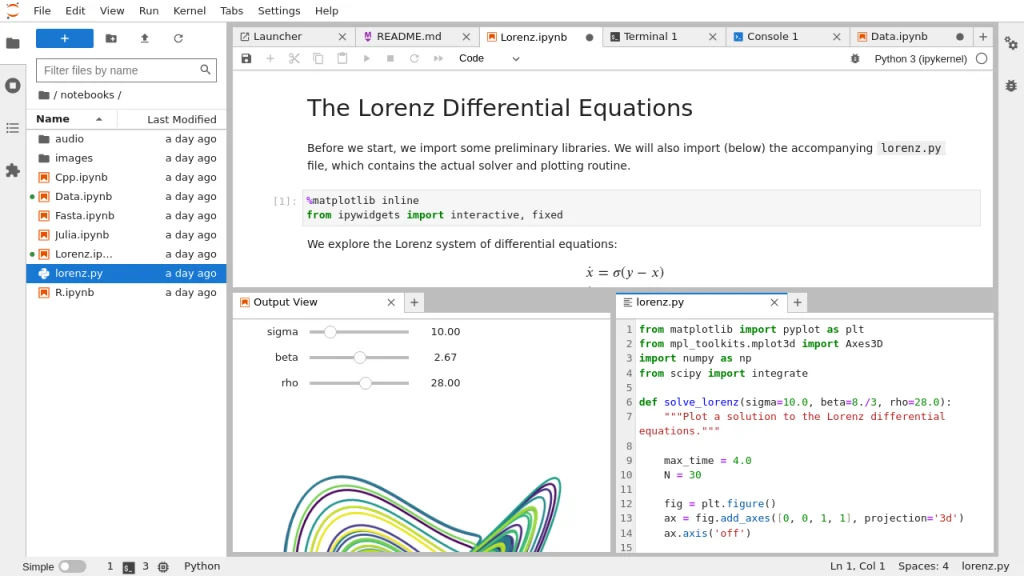
Jupyter Notebook is widely embraced by data scientists for its versatility and user-friendly interface. It is particularly known for Jupyter documents and its integration with IPython Notebook. This open-source Python IDE supports an interactive computational environment, making it ideal for data analysis, data visualization, and scientific computing.
Key Features
Jupyter Notebook offers several core features:
- Interactive Computational Environment: Allows users to execute Python code in real-time, facilitating immediate feedback.
- Ease of Use: Its straightforward interface is ideal for data analysis and visualization tasks.
- Support for Narrative Text and Live Code: Users can combine explanatory text with live code, making it perfect for tutorials and presentations.
- Tools for Scientific Research and Statistical Analysis: Equipped with various tools that cater to scientific computing needs.
Strengths and Weaknesses
Advantages:
- User-Friendly Interface: Easy for beginners to learn and use.
- Rich Ecosystem of Plugins: Enhances functionality and extends capabilities.
- Good for Beginners: Intuitive and accessible for those new to data science and programming.
Disadvantages:
- Limited Support for Advanced Features: Features like version control systems and advanced code navigation are less developed compared to other IDEs.
2. VS Code (Visual Studio Code)
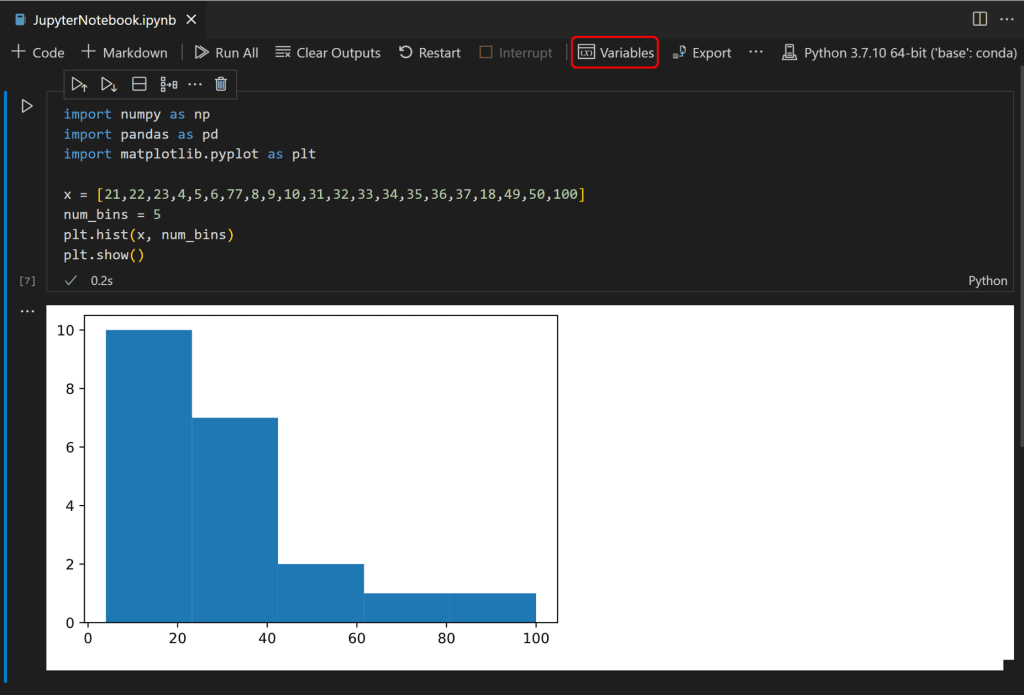
Visual Studio Code (VS Code) is a highly popular open-source IDE utilized across various domains, including data science and web development. Known for its flexibility and robust feature set, it is a favored choice among Python developers.
Key Features
VS Code is packed with powerful features:
- Code Completion and Syntax Highlighting: Facilitates efficient coding with fewer errors.
- Powerful Code Editor: Supports extensive customization and enhancements.
- Integrated Terminal and Interactive Console: Streamlines the coding and testing process.
- Support for Multiple Programming Languages: Versatile and suitable for projects involving different languages.
- Rich Ecosystem of Plugins: Extends functionality to meet specific needs.
Strengths and Weaknesses
Advantages:
- Open-Source IDE: Free to use and highly customizable.
- Extensive Range of Features: From basic editing to advanced development tools.
- Ease of Use: Despite its depth, it’s accessible to new users.
Disadvantages:
- Overwhelming for New Users: The vast number of features can be daunting initially.
3. Spyder Editor
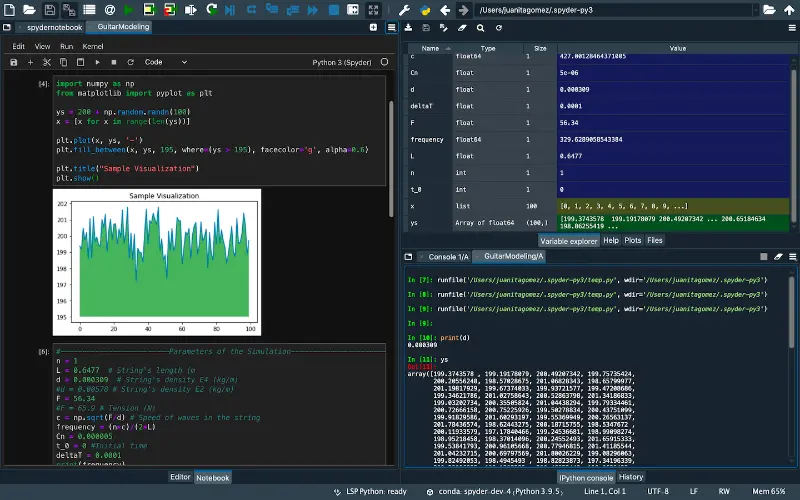
Spyder Editor is a specialized Python IDE designed for scientific computing. It integrates seamlessly with the IPython console, supporting both interactive testing and advanced editing.
Key Features
Spyder offers unique features tailored for scientific research:
- Built-in Debugger and Interactive Python Console: Facilitates efficient debugging and testing.
- Advanced Editing Capabilities: Supports features like code introspection and advanced editing.
- Tools for Statistical Analysis and Scientific Research: Includes functionalities specifically for scientific and data-intensive tasks.
Strengths and Weaknesses
Advantages:
- Specific Needs for Scientific Computing: Excellent integration with scientific libraries and tools.
- Ease of Use for Scientific Research: Tailored interface and features make it ideal for research purposes.
Disadvantages:
- Less Intuitive Compared to Modern IDEs: May not be as user-friendly as VS Code or other modern IDEs.
4. Sublime Text
Sublime Text is a popular text editor known for its speed and performance. It’s a good choice for those who need a lightweight yet powerful editor for Python development.

Key Features
Sublime Text stands out with:
- Powerful Code Editor: Features syntax highlighting and code navigation.
- Support for Different Languages: Versatile and useful for multi-language projects.
- Range of Features for Python Development: Supports plugins that enhance Python programming capabilities.
Strengths and Weaknesses
Advantages:
- Lightweight and Fast: Optimized for performance, making it a quick and responsive tool.
- Extensive Plugin Ecosystem: Allows extensive customization to suit various project-specific preferences.
Disadvantages:
- Requires Configuration: Additional setup may be needed for optimal use in data science projects.
5. PyCharm
PyCharm is a well-known IDE for Python development, recognized for its comprehensive and powerful features. It is particularly favored for complex projects and professional use.

Key Features
PyCharm includes:
- Advanced Editing, Setting Breakpoints, and Visual Debuggers: Essential tools for professional development.
- Code Introspection: Helps in understanding and navigating complex codebases.
- Support for Machine Learning and Data Science Projects: Tailored features for these specialized areas.
Strengths and Weaknesses
Advantages:
- Comprehensive Feature Set: Offers a wide range of tools for advanced Python development.
- Powerful Tools for Professional Developers: Suitable for high-level development tasks.
Disadvantages:
- Resource-Intensive: Requires significant system resources, which may affect performance.
- Steeper Learning Curve: Can be challenging for beginners to master.
6. Atom
Atom is a modern, open-source text editor developed by GitHub. It is highly customizable, making it a versatile choice for various development needs.

Key Features
Key features of Atom include:
- Rich Ecosystem of Plugins: Extends functionality to meet diverse requirements.
- Support for Vertical Splitting, Keyboard Shortcuts: Enhances productivity and workflow.
- Various Tools for Python Development: Includes plugins and features tailored for Python programming.
Strengths and Weaknesses
Advantages:
- Highly Customizable: Users can tailor the editor to their specific needs.
- Open Source: Free to use and modify, promoting collaboration and community contributions.
- Good for Collaborative Work: Features that support teamwork and version control.
Disadvantages:
- Performance Issues with Larger Projects: Can be slower when handling extensive codebases.
7. Other Noteworthy IDEs
In addition to the IDEs introduced above, there are more IDE that you might want to check.
7.1 Thonny
Thonny is beginner-friendly and particularly useful for Python tutorials and educational purposes. Its simplicity and user-friendly interface make it an excellent choice for new programmers.
7.2 JupyterLab
An enhanced version of Jupyter Notebook, JupyterLab offers additional features that support more complex and sophisticated projects. It provides an even more powerful interactive computational environment.
7.3 Rodeo
Rodeo is designed specifically for data science, with a strong focus on data visualization and statistical analysis. It is tailored to meet the needs of data scientists working with big data and complex data sets.
Conclusion
Selecting the best IDE for working with the Python language is crucial for optimizing productivity in data analytics, desktop applications, and developing new languages. The most popular IDEs, such as Jupyter Notebook and VS Code, offer robust Python development environments that support advanced courses and the best way to write Python scripts. Key features like source code control, support for data structures, and integration with Python libraries enhance code quality and efficiency. For those working on the Windows platform, having a reliable LTS version and tools like a file system browser, modal editor, and visible line numbers are essential. Whether you’re managing SQL queries, exploring artificial intelligence, or earning college credits, the right IDE can significantly improve your workflow and outcomes.